


 美国
美国 Best Seller
 Label Printers
 All PDAs
 All Tablets
 All Thermal Labels
 Printer Accessories
If you regularly print shipping labels, product labels, barcodes, or address labels, a wireless label printer can make your workflow much easier. Instead of connecting your computer with a cable every time you need to print, an AirPrint label printer lets you send print jobs wirelessly from compatible Apple devices. For small businesses, online sellers, retailers, and home offices, this can save time and reduce unnecessary setup.
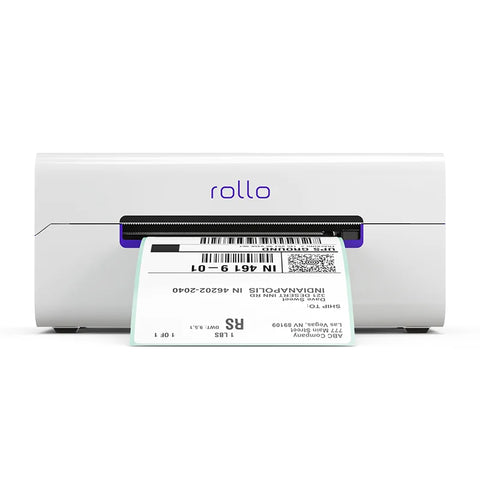
Two popular options are the MUNBYN RW401AP 300DPI AirPrint Thermal Label Printer and the Rollo Wireless Printer X1040. Both support wireless printing, AirPrint, and direct thermal labels, and both print at up to 150 mm/s. However, they take different approaches to print quality, device compatibility, and overall functionality.
So, which one should you choose?
The answer depends on what you print, which devices you use, and how much you value higher-resolution output. This guide compares the MUNBYN RW401AP and Rollo X1040 across the factors that matter most.

MUNBYN RW401AP vs. Rollo X1040: At a Glance
Before looking at each feature in detail, here's a quick comparison of the two wireless label printers.
| Feature | MUNBYN RW401AP | Rollo Wireless Printer X1040 |
|---|---|---|
| Printing Technology | Direct Thermal | Direct Thermal |
| Resolution | 300 DPI | 203 DPI |
| Printing Speed | Up to 150 mm/s | Up to 150 mm/s |
| Wireless Printing | Wi-Fi | Wi-Fi |
| Apple AirPrint | Yes | Yes |
| USB | Yes | Yes |
| Label Width | 40–110 mm | Up to 4.1 in |
| Weight | 0.815 kg / 1.8 lbs | Approx. 3 lbs |
| Dimensions | 198 × 96 × 109 mm | 8 × 4 × 4 in |
| Compatible Platforms | Windows, Mac, iOS, Android | Windows, Mac, iOS, Android, Chromebook, Linux |
| Best For | High-resolution labels and wireless multi-device printing | Shipping-focused users who need broad OS support |
Specifications can change over time, so always check the manufacturer's product page before purchasing.
1. Design and Size: Which Printer Takes Up Less Space?
For a small office, home workspace, retail counter, or packing station, printer size matters more than you might expect. A compact label printer is easier to position beside a laptop, packing supplies, or other equipment.
The MUNBYN RW401AP measures 198 × 96 × 109 mm and weighs approximately 0.815 kg (1.8 lbs). Its compact footprint makes it easy to place on a desk or packing station without taking up much room.
The Rollo X1040 measures approximately 8 × 4 × 4 inches and weighs about 3 lbs, making it noticeably heavier than the RW401AP.
Neither printer is designed as a battery-powered portable printer, so "portability" here is primarily about moving and positioning the printer around your workspace. If you frequently rearrange your packing station or simply want to save desk space, the lighter MUNBYN RW401AP has an advantage.
Winner for compact design: MUNBYN RW401AP
2. AirPrint and Wireless Connectivity
For Apple users, AirPrint is one of the most important features to look for.
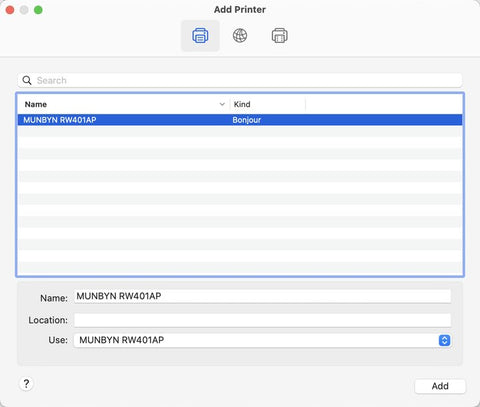
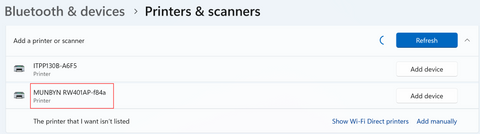
The MUNBYN RW401AP supports Apple AirPrint, allowing users to print directly from compatible iPhone, iPad, or Mac devices without installing a separate AirPrint driver. The printer connects to the same Wi-Fi network as the Apple device, making wireless printing straightforward.
The RW401AP also supports Wi-Fi connections with Windows, Mac, iOS, and Android devices. Windows and Mac computers can additionally connect through USB.
One of the newer highlights of the RW401AP is its 1300 Mbps Wi-Fi capability. MUNBYN positions this as a way to provide a faster and more stable wireless connection, particularly for environments where several devices share the network. The product page also states that the printer can support multiple connected devices.
Rollo's X1040 also supports Wi-Fi and AirPrint, as well as USB connectivity. Rollo markets the printer as a wireless solution that can work across a wide range of devices and operating systems, including iPhone, iPad, Android, Windows, Mac, Chromebook, and Linux.
If your business is primarily Apple-based, both printers provide the wireless convenience you're looking for. If Linux support is essential, however, the Rollo X1040 has the broader officially listed OS compatibility.
3. Print Quality: 300 DPI vs. 203 DPI
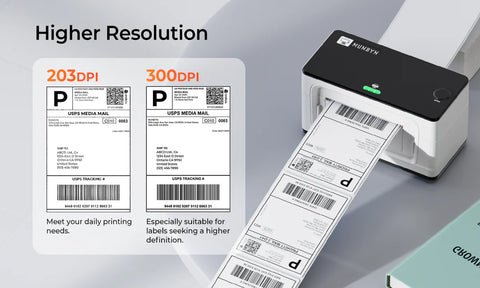
Resolution is one of the clearest differences between these two printers. The MUNBYN RW401AP uses a 300 DPI printhead, while the Rollo X1040 uses 203 DPI. For standard 4 × 6 shipping labels, 203 DPI is generally sufficient. Shipping addresses and standard barcodes don't necessarily require extremely high resolution. However, higher resolution becomes more valuable when your labels contain:
- Small text
- Dense barcodes
- QR codes
- Fine lines
- Product information
- Small logos
- Detailed graphics
- Small product or jewelry labels
At 300 DPI, the RW401AP can reproduce smaller details with greater definition. This makes it more versatile for businesses that use their thermal printer for more than basic shipping labels.
MUNBYN also highlights the RW401AP's Rohm printhead and claims improvements in durability and print output compared with its previous design.
If you only print standard shipping labels, the difference between 203 DPI and 300 DPI may not be critical. But if print clarity is a priority, particularly for smaller labels, the higher-resolution MUNBYN printer has a meaningful advantage.
Winner for print resolution: MUNBYN RW401AP
4. Label Size and Compatibility
The type and size of labels you use should be another important consideration.
The MUNBYN RW401AP supports direct thermal labels between 40 and 110 mm wide, which covers standard 4 × 6 shipping labels as well as narrower labels for barcodes, addresses, products, envelopes, and organization.
MUNBYN also lists compatibility with major ecommerce platforms and shipping services, including Amazon, Shopify, eBay, Etsy, UPS, and FedEx.
Rollo takes a similarly flexible approach. The X1040 supports a wide range of direct thermal labels, including common 4 × 6 shipping labels and smaller formats. Rollo specifically promotes its "Label Freedom" approach, allowing users to work with different direct thermal label sizes without being locked into proprietary media.
For most ecommerce sellers, both printers can handle the standard labels needed for shipping and order fulfillment.
5. Price: Look Beyond the Sticker Price
Price is an important part of any printer comparison, but it's also one of the easiest specifications to become outdated.
The previous version of this article listed the MUNBYN RW401AP at $269.99 and the Rollo X1040 at $259.99. Those prices are no longer reliable. MUNBYN's current product page lists the RW401AP with a current promotional price, while Rollo currently lists the Wireless Printer at $279.99.
Because both brands regularly run promotions, it is better to check the current product pages before making a purchasing decision rather than relying on a fixed price in a comparison article. More importantly, consider what you are getting for the price.
The RW401AP combines:
- 300 DPI resolution
- AirPrint
- Wi-Fi connectivity
- USB connectivity
- 40–110 mm label support
- 150 mm/s printing
- Compact dimensions
- 2-year warranty
- Lifetime support
MUNBYN also currently advertises a 14-day risk-free trial and 30-day price match on its U.S. product page.
The Rollo X1040, meanwhile, includes wireless printing, AirPrint certification, automatic label detection, 203 DPI resolution, and Rollo's shipping software ecosystem.
Rather than choosing solely based on which printer is cheaper on a particular day, compare the features that actually matter to your workflow.
6. Warranty and Long-Term Support
A label printer often becomes part of a business's daily shipping workflow, so after-sales support is worth considering.
The MUNBYN RW401AP currently comes with a 2-year warranty and technical support. MUNBYN also advertises lifetime support for the product.
This can be particularly valuable for small businesses that rely on their printer every day and don't want a hardware issue to interrupt order fulfillment.
Rollo also provides customer support and product guarantees, but warranty terms can vary by product and market. For that reason, it's best to check the current warranty terms directly before purchase.
MUNBYN RW401AP vs. Rollo X1040: Which One Should You Choose?
There isn't one perfect wireless label printer for every business. The better choice depends on your priorities.
Choose the MUNBYN RW401AP if you:
- Want a 300 DPI AirPrint label printer
- Print small text, detailed graphics, barcodes, or QR codes
- Primarily use iPhone, iPad, Mac, Windows, or Android devices
- Want both Wi-Fi and USB connectivity
- Prefer a smaller and lighter printer
- Need labels from 40 to 110 mm wide
- Want a longer stated warranty period
- Want a wireless printer for both shipping and general labeling
Choose the Rollo X1040 if you:
- Need Linux compatibility
- Primarily print standard shipping labels
- Want broad operating-system compatibility
- Prefer Rollo's shipping software ecosystem
- Don't need 300 DPI resolution
- Want a proven 203 DPI shipping-label solution
Final Verdict: MUNBYN RW401AP vs. Rollo X1040
Both the MUNBYN RW401AP and Rollo X1040 are capable wireless thermal label printers, and both offer the convenience of Wi-Fi and AirPrint. Neither requires traditional ink or toner, and both can reach printing speeds of up to 150 mm/s.
The biggest difference is not speed. It's resolution and overall positioning. For a business that primarily needs to print standard 4 × 6 shipping labels, either printer can be a strong choice. But if you want a 300 DPI wireless label printer that can handle both shipping labels and more detailed product, barcode, or organization labels, the MUNBYN RW401AP is the more feature-rich option. If high-resolution output and flexible everyday labeling are priorities, take a closer look at the MUNBYN RW401AP 300DPI AirPrint Thermal Label Printer.
Share:
What Is an AirPrint Printer and How Do You Use It?
Why Do You Need an AirPrint Printer?